
9 min read
Disclosure: As an Amazon Associate and eBay Partner Network publisher, we earn from qualifying purchases. This doesn’t affect what we recommend or how we describe it.
A digital wall calendar can save you from missing appointments, forgetting birthdays, or turning up at the dentist a week early (yes, it happens). The display size on these devices varies from a compact 6.5 inches up to a whopping 27 inches, and that gap matters: bigger screens mean easier reading from across the room, more info at a glance, and less squinting for anyone with ADHD, aging eyes, or a tendency to run past the calendar at full speed. Here’s what to look for (and what to avoid) if you want a digital wall calendar that actually helps you stay on track — without drowning you in features you’ll never use.
Top picks at a glance
- Apolosign Smart Digital Calendar 27″ Wall Mountable Planner FA2769T — the largest and most premium option
- La Crosse Technology 513-23137 Atomic Digital Wall Clock with Moon Phase — the best for simple date and time display
- La Crosse Technology WT-8005U-S Atomic Digital Wall Clock with Temperature & Date — the most affordable atomic wall clock
Display size and visibility
If you’ve ever missed a reminder because you couldn’t read the calendar from your kitchen, you’ll appreciate how much size matters. The Apolosign Smart Digital Calendar 27″ Wall Mountable Planner FA2769T is, by spec, the largest option currently available in this category, with a 27-inch display that’s roughly the size of a small TV. This makes it ideal for big rooms, classrooms, or shared spaces where visibility from a distance is crucial.
By contrast, the La Crosse Technology 513-23137 Atomic Digital Wall Clock with Moon Phase and La Crosse Technology WT-8005U-S Atomic Digital Wall Clock with Temperature & Date both offer much more compact screens (under 10 inches diagonal), making them a fit for smaller spaces or if you just want the essentials: date, time, and maybe temperature. If you need to check your calendar from across a busy kitchen or living room, the Apolosign FA2769T is the clear winner. But if you’re after a straightforward wall clock with a date display you can fit above your desk, either La Crosse model will do the trick.
Calendar features and information displayed
Not all digital wall calendars are created equal when it comes to what they actually show. The Apolosign FA2769T is positioned as a full-featured digital planner, with a large-format screen designed to display event schedules, notes, and possibly even photos or reminders (depending on the app integration and software). This makes it a strong fit if you want your calendar to do more than just show the date — it’s a true planning hub for busy households or offices where everyone needs to see what’s coming up.
The La Crosse 513-23137, as its name suggests, is more of an atomic digital wall clock with a calendar function. It shows the date, time (including atomic timekeeping for accuracy), and moon phase, but doesn’t offer event scheduling or planning features. The La Crosse WT-8005U-S adds indoor temperature to the mix, which is handy if you want a quick read on the room conditions as well as the date. Both are best for people who want a reliable, always-correct clock and a simple calendar, not a digital planner.
Comparison table: side-by-side details
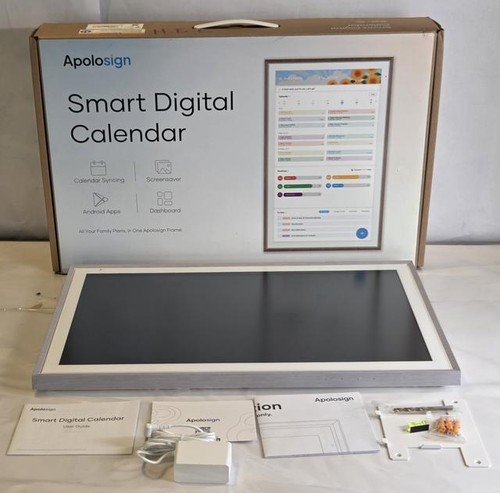
Pictured: Apolosign FA2769T
| Product | Condition | Price | Best For | Display Size | Extra Features |
|---|---|---|---|---|---|
| Apolosign Smart Digital Calendar 27″ Wall Mountable Planner FA2769T |
New – Open Box | $$$ | Largest, most premium option | 27″ diagonal | Wall-mountable, planner functions |
 La Crosse Technology 513-23137 Atomic Digital Wall Clock with Moon Phase La Crosse Technology 513-23137 Atomic Digital Wall Clock with Moon Phase |
New | $$ | Simple date and time display | ~7″ diagonal | Atomic time, moon phase |
 La Crosse Technology WT-8005U-S Atomic Digital Wall Clock with Temperature & Date La Crosse Technology WT-8005U-S Atomic Digital Wall Clock with Temperature & Date |
New | $ | Most affordable atomic wall clock | ~6.5″ diagonal | Atomic time, indoor temperature |
Price tiers ($/$$/$$$) read across this comparison only — they mark each product’s relative position from cheapest to priciest in the set. Actual prices live below.
Setup and mounting
Wall-mounting a digital calendar should be as easy as hanging a picture frame, not a weekend project. The Apolosign FA2769T is specifically described as “wall mountable,” and with its 27-inch size, you’ll want to anchor it securely — think two sturdy screws or a wall bracket, not a stick-on hook. Larger displays are heavier, so check for included mounting hardware and make sure your wall can handle the weight (usually 5-10 lbs for a screen this size).
Both La Crosse models are much lighter (typically under 2 lbs), and usually come with a simple keyhole slot or fold-out stand for tabletop use. If you’re renting, or you want something you can move around, the smaller La Crosse clocks are much less of a commitment. Just be aware that smaller screens can get lost on a big wall.
Atomic timekeeping and accuracy
If you’re chronically late, atomic timekeeping is a lifesaver. Both the La Crosse 513-23137 and the La Crosse WT-8005U-S are “atomic” clocks, meaning they sync with the official time signal from the National Institute of Standards and Technology (NIST) — so you never have to set them yourself. This is especially handy for daylight saving changes and anyone who can’t be bothered to fiddle with tiny buttons. The Apolosign FA2769T, by contrast, is positioned as a digital planner and may not offer atomic timekeeping (manufacturer specs don’t list it), so you’ll want to double-check if perfectly accurate time is a must-have.
For more on how atomic clocks work, check out the NIST official site.
Red flags in listings to walk past
- No stated display size: If a listing just says “large screen” but gives no inches or dimensions, assume it’s smaller than you think. Always look for a specific number (like 27″, 7″, etc.).
- Stock photos only, no in-room shots: If you can’t see the calendar on an actual wall, you’re likely looking at a generic product with unclear scale or build quality. Real photos help you judge if it’ll fit your space.
- Missing information about timekeeping: If a digital calendar doesn’t mention atomic time (or manual setting), you may end up with a clock that drifts and needs constant resetting.
- “Planner” or “smart” with no software details: Some listings hype up “smart” features but don’t specify if there’s an app, Wi-Fi, or any way to actually input events. Look for clear descriptions of what you can and can’t do.
- Unbranded or “OEM” models: Generic brands with no support or warranty details are risky for electronics you want to last years on your wall.
Related Guides
- Our guide to Digital Wall Calendars That Are Actually Worth Hanging Up
- Our guide to Bluetooth Key Finders That Actually Work: Our Favorites for 2026
- Our guide to Fitness Trackers With Alarm Features That Actually Wake You Up
- Setting Up Medication Reminders That Actually Work: A No-Nonsense Guide
- Visual Timers That Truly Help Adults With ADHD Stay on Track
- Alarm Clocks That Actually Help With ADHD Forgetfulness
- Browse all Calendars & Boards →
How we made the shortlist
For this guide, products were selected based on five practical criteria: display size (for visibility), feature set (calendar vs clock vs planner functions), atomic timekeeping (for accuracy), mounting options, and price tier. We compared the listed specifications and market positioning for each product — focusing on how much info is visible at a glance, whether the device can replace a paper calendar, and how easy it is to mount or move.
We excluded unbranded listings with no clear specs, bundles that obscure the actual product, and any digital calendars that don’t state their display size or main functions. All three products here come from established brands with clear documentation, and each fills a distinct niche: full-featured planner, simple atomic calendar, or budget-friendly date-and-time clock.
If you’re looking for a digital wall calendar that syncs with Google Calendar or pushes reminders to your phone, these models won’t fit — you’ll want a dedicated smart display or a reminder app (like DontForget on Telegram) instead. For most people who just want a highly visible, always-correct calendar on the wall, these are the most reliable options currently available.
For more on comparing digital display technologies and specs, see the CNET tech section.
FAQ: Digital wall calendars
Is a 27-inch digital wall calendar too big for a home office?
A 27-inch display, like the one on the Apolosign FA2769T, is about the size of a small TV. It’s excellent for large rooms or spaces where multiple people need to see the calendar at a glance. For a small home office, it may feel oversized — but if you want maximum visibility, it’s hard to beat.
Do atomic clocks really stay accurate over time?
Atomic clocks like the La Crosse 513-23137 and WT-8005U-S sync with radio signals from the NIST, keeping them accurate to within a fraction of a second. You may need to replace the batteries every 12-24 months, but the time itself won’t drift as long as the signal is received.
How does the La Crosse 513-23137 compare to the WT-8005U-S for basic use?
Both are atomic wall clocks with date displays, but the 513-23137 adds a moon phase indicator, while the WT-8005U-S shows indoor temperature. If you want a quick read on room conditions, the WT-8005U-S is better; if you’re a moon-watcher, the 513-23137 is for you.
Will these digital wall calendars work in low light or at night?
Most digital wall calendars use LCD displays, which are visible in normal room light but may not be backlit. If the listing doesn’t mention a backlight, assume you’ll need some ambient light to read the display at night. Backlit models are rare in this price range.
What’s the warranty or return policy like for these products?
Brand-name options like Apolosign and La Crosse typically include a one-year limited warranty, but always check the seller’s listing for specific terms. Open-box items (like the Apolosign FA2769T) may have different return windows or coverage.
Is the Apolosign FA2769T worth the price difference over the La Crosse models?
If you need a giant, wall-filling planner with true scheduling features, the Apolosign FA2769T justifies its premium tier. For most people who only want date, time, and maybe temperature, the La Crosse models provide all the essentials at a lower price. Only pay up if you’ll actually use the extra screen space and planner tools.
Can I hang these calendars in a classroom or shared space?
Absolutely. The Apolosign FA2769T is especially suited for classrooms, offices, or communal areas due to its size and visibility. The smaller La Crosse models work well in kitchens, home offices, or smaller meeting rooms.
Do any of these models sync with online calendars or smartphones?
None of the three models covered here offer direct syncing with Google Calendar or smartphones. They’re best for people who want a physical, always-visible display — not digital notifications or app integration.


Still going to forget, aren’t you?
DontForget is a free Telegram reminder app that doesn’t ping once and give up — it hounds you (in a tone you choose, from gentle to brutal) until you actually do the thing. Nothing to download; it runs right inside Telegram.
Try DontForget free →Last updated: June 2026 · Our editorial process