
9 min read
Disclosure: As an Amazon Associate and eBay Partner Network publisher, we earn from qualifying purchases. This doesn’t affect what we recommend or how we describe it.
The best family wall calendar for you depends on how your household actually runs: go digital with a giant touchscreen if you want everything in one place, or stick with classic paper if you just need a quick, friendly glance at everyone’s week. Here’s how the top family wall calendars compare — from smart screens to themed planners — and how to pick the right fit for your family’s real-life chaos.
Top picks at a glance
- Skylight Calendar Max 27″ Smart Family Wall Calendar Touchscreen Display — the most feature-rich
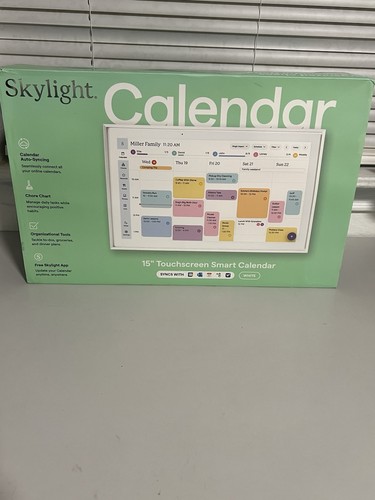
- Skylight 15″ Smart Calendar Touchscreen Digital Family Planner Wall Display — the compact smart option
- Mom’s Family Wall Calendar by Farris Grace; Workman — the classic paper pick
- Disney Dreams by Thomas Kinkade Studios 17-Month 2025-2026 Family Wall Calendar — the themed family option
Why “more features” isn’t always better for family wall calendars
It’s tempting to grab the biggest, fanciest digital display you can find, but in practice, the best calendar is the one your whole crew will actually use. Some families need color-coded digital reminders and live syncing; others just want a big box to jot down soccer practice and birthdays. Below, you’ll find a comparison of the most popular options — including smart displays and classic paper picks — with honest guidance on which type actually solves your “who’s doing what, when?” headache.
Side-by-side: How the top family wall calendars compare

Pictured: Skylight Calendar Max
| Product | Condition | Price | Best For | Display Size / Format | Special Features |
|---|---|---|---|---|---|
| Skylight Calendar Max 27″ Smart Family Wall Calendar Touchscreen Display |
New | $$$ | Feature-packed digital planning | 27″ touchscreen | Syncs with Google/Outlook, color-coding, reminders |
 Skylight 15″ Smart Calendar Touchscreen Digital Family Planner Wall Display Skylight 15″ Smart Calendar Touchscreen Digital Family Planner Wall Display |
Open Box | $$ | Compact smart option | 15″ touchscreen | Syncs with digital calendars, color-coding, reminders |
 Mom’s Family Wall Calendar by Farris Grace; Workman Mom’s Family Wall Calendar by Farris Grace; Workman |
Very Good | $ | Classic, low-tech paper | Paper, 12-month (monthly view) | Columns for each family member, stickers |
 Disney Dreams by Thomas Kinkade Studios 17-Month 2025-2026 Family Wall Calendar Disney Dreams by Thomas Kinkade Studios 17-Month 2025-2026 Family Wall Calendar |
New | $ | Themed, kid-friendly option | Paper, 17-month (monthly view) | Disney art, family-friendly layout |
About the $ symbols: they’re a quick budget/mid/premium read of where each option sits relative to the others in this comparison. See current prices in the live listings below.
What most buying guides miss about family wall calendars
Most roundups just list features, but the real difference is how well a calendar fits into your daily routine. For example, the Skylight Calendar Max 27″ Smart Family Wall Calendar Touchscreen Display is a huge, interactive screen that can sync everyone’s digital schedules and display reminders right on the wall. It’s ideal if your family already lives on digital calendars and you want a single “command center” in the kitchen or hallway.
On the other hand, the Mom’s Family Wall Calendar by Farris Grace; Workman keeps things old-school with a big paper format, columns for up to five family members, and a spot for notes. It’s the kind of calendar you can scribble on while pouring coffee, and it never needs charging or Wi-Fi.
The Skylight 15″ Smart Calendar Touchscreen Digital Family Planner Wall Display offers most of the same digital features as the Max, but with a smaller 15-inch screen. This makes it easier to fit in apartments or smaller spaces, but the display is more compact, so you’ll want to stand close for details.
If you want a calendar that doubles as cheerful wall art, the Disney Dreams by Thomas Kinkade Studios 17-Month 2025-2026 Family Wall Calendar is the clear winner. It’s a 17-month paper calendar with classic Disney artwork, so it’s especially appealing in playrooms or kids’ bedrooms — but still has enough writing space for family activities.
Related Guides
- Digital Wall Calendars That Actually Help You Stay on Track
- Digital Wall Calendars That Are Actually Worth Hanging Up
- Medication Reminder Devices for Seniors That Actually Work
- The Top 5 Fitness Trackers Worth Your Money
- Loud Alarm Clocks That Actually Wake You Up
- Our guide to Bluetooth Key Finders for Android: Which Ones Actually Work?
- Browse all Calendars & Boards →
Specifications that actually matter
Display Size / Layout
A calendar’s size isn’t just about “bigger is better.” The 27-inch touchscreen on the Skylight Calendar Max is easy to see from across the room, but takes up real wall space. Paper calendars like Mom’s Family Calendar are usually about 12-14 inches wide, making them easy to fit on a fridge or narrow wall. Pick a size that matches both your wall and your eyesight.
Syncing and Reminders
Digital calendars like the Skylight models let you sync with Google or Outlook, so everyone’s appointments and reminders show up automatically. If you want pop-up notifications or to color-code by person, digital is the way to go. Paper calendars require manual updates — but you’ll never deal with an app crash.
Family Member Tracking
Look for calendars with separate columns or color-coding for each person. Mom’s Family Calendar gives you five columns for different family members, which is enough for most households. Digital options let you assign colors or icons, but check that your chosen calendar supports enough profiles for your crew.
Writing Space
No one wants to squint at tiny boxes. Paper calendars vary: Mom’s Family Calendar offers generous daily spaces, while themed options like Disney Dreams sometimes trade space for artwork. Digital displays can show more detail, but only if the screen is large enough (15″ or bigger is best for busy families).
Power and Setup
Digital calendars need wall power and Wi-Fi. The Skylight models are plug-in only, so you’ll need an outlet nearby. Paper calendars hang anywhere and require zero tech know-how — just a nail and a pen.
Who should choose which family wall calendar?
If your family juggles work, school, and activities with lots of schedule changes, the Skylight Calendar Max is the most powerful option. It’s designed as a true “family hub,” with a massive 27″ touchscreen, cloud syncing, color-coding, and built-in reminders. You’ll want dedicated wall space and a nearby outlet, but it’s the only pick here that can replace sticky notes, group texts, and digital chaos all at once.
For smaller spaces (or smaller budgets), the Skylight 15″ Smart Calendar covers most of the same features in a more compact package. It’s better for apartments, shared dorms, or anyone who wants a digital calendar but can’t fit a giant display.
Prefer paper? The Mom’s Family Calendar is a classic for a reason. It’s easy to read, gives each family member their own column, and comes with stickers for birthdays and appointments. No batteries, no logins, and no learning curve — just hang it up and start scribbling.
The Disney Dreams Family Calendar is perfect if you want a calendar that makes you (and your kids) smile every time you check the date. It’s less specialized for large families, but great for adding a bit of joy to everyday planning.
How these made the shortlist
The family wall calendars featured here were chosen for their clear, family-focused layouts, reputation among real users, and diversity of features. Selection criteria included display size and clarity (is it actually readable from across the room?), the ability to track multiple people (columns, color-coding, or syncing), writing space for busy days, reminder options, and setup complexity. Only products with a clear family-use design made the cut: we skipped generic wall calendars, unbranded options with no user feedback, and bundles that buried the core calendar in unrelated extras.
Our research compared manufacturer specs, listed features, and market positioning for each calendar. Digital models had to offer real syncing and reminders; paper picks needed to be genuinely family-friendly, not just “pretty.” If you’re a solo user or only need to track your own appointments, you might be happier with a simple personal planner or a digital calendar app instead.
For a deeper dive into paper vs. digital planning, you can find guidance and tips at Wirecutter’s home organization section.
FAQ: Family wall calendars demystified
Is a giant smart wall calendar like the Skylight Calendar Max worth it for most families?
It depends on how much you rely on digital schedules and reminders. The Skylight Calendar Max is best for large or busy families who already use Google or Outlook calendars and want everything visible in one spot. If your family prefers jotting things down by hand, it may be overkill.
How many family members can you track on Mom’s Family Calendar?
Mom’s Family Calendar has five columns, so you can track up to five people separately each month. This is usually enough for most households, but if you have a larger family, you may need creative color-coding or a second calendar.
How much wall space do the digital displays require?
The Skylight Calendar Max is 27 inches diagonally and needs a large, visible area — roughly the size of a small TV. The Skylight 15″ Smart Calendar is much smaller and fits in tighter spaces, but you’ll need to stand closer to read the details. Always measure your wall before buying.
Which is easier to set up: paper or digital?
Paper calendars like Mom’s Family Calendar or Disney Dreams Family Calendar are hang-and-go — just add a nail or hook. Digital options require Wi-Fi, power, and linking your online calendars, which can take 10-30 minutes depending on your tech comfort.
Disney Dreams Family Calendar vs. Mom’s Family Calendar — which is better for young kids?
The Disney Dreams Family Calendar is more visually engaging for younger kids thanks to the Disney artwork, making it a fun addition to a playroom or bedroom. Mom’s Family Calendar is better for organizing busy schedules, especially if you need separate columns for each child.
Can you return or exchange these calendars if they aren’t a fit?
Return and exchange policies depend on where you buy. Most major retailers offer 15-30 day returns for new, unopened calendars; open-box digital displays may have more limited return windows. Always check the seller’s policy before purchasing, especially for higher-priced digital calendars.
What if my family never checks the wall calendar?
No calendar works if it’s ignored. Place your calendar somewhere unavoidable, like next to the fridge or front door. For digital displays, enable reminders and alerts to nudge everyone. If your household lives on their phones, consider supplementing with shared apps or reminders for extra backup.
One last thing: Choosing what you’ll actually use
The best family wall calendar is the one that fits your habits, not just your wall. If you need reminders, color-coded chaos control, and real-time syncing, a digital display like the Skylight Calendar Max or Skylight 15″ Smart Calendar will serve you well. If you’re a pen-and-paper family or want something the kids can decorate, Mom’s Family Calendar or the Disney Dreams Family Calendar is the way to go. For backup reminders on your phone (or to nudge the forgetful among you), try a free reminder app like DontForget alongside your wall calendar.


Still going to forget, aren’t you?
DontForget is a free Telegram reminder app that doesn’t ping once and give up — it hounds you (in a tone you choose, from gentle to brutal) until you actually do the thing. Nothing to download; it runs right inside Telegram.
Try DontForget free →Last updated: June 2026 · Our editorial process