
7 min read
Disclosure: As an Amazon Associate and eBay Partner Network publisher, we earn from qualifying purchases. This doesn’t affect what we recommend or how we describe it.
You’re staring at the wall calendar, marker in hand, and you can’t for the life of you remember if the dentist appointment was moved to Tuesday or if you just dreamed that. If you’re tired of scribbled notes, missed events, and the endless hunt for your phone’s calendar app, a digital wall calendar could finally bring some order to your chaos. This guide compares the top digital wall calendars you can actually buy right now, so you can pick the right one for your wall — and your memory.
Top picks at a glance
- Skylight Calendar 15-Inch Digital Wall Planner — the most recognised brand option
- La Crosse Technology 513-23137 Atomic Digital Wall Clock with Moon Phase — the best for simple date and time display
- La Crosse Technology WT-8005U-S Atomic Digital Wall Clock with Temperature & Date — the most affordable recognised-brand pick
How each digital wall calendar stacks up

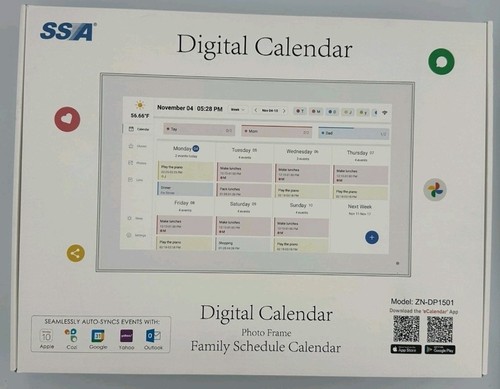
Pictured: Skylight Calendar
| Product | Condition | Price | Best For | Screen Size | Extra Features |
|---|---|---|---|---|---|
| Skylight Calendar 15-Inch Digital Wall Planner |
Used | $$$ | Most recognised brand option | 15-inch | Shared calendars, touchscreen, WiFi |
 La Crosse Technology 513-23137 Atomic Digital Wall Clock with Moon Phase La Crosse Technology 513-23137 Atomic Digital Wall Clock with Moon Phase |
New | $$ | Simple date and time display | — | Atomic clock, moon phase, indoor temp |
 La Crosse Technology WT-8005U-S Atomic Digital Wall Clock with Temperature & Date La Crosse Technology WT-8005U-S Atomic Digital Wall Clock with Temperature & Date |
New | $ | Most affordable recognised-brand pick | — | Atomic clock, indoor temp, calendar date |
Note on pricing: the $ symbols are relative tiers within this comparison — $ is the cheapest of the bunch, $$$ the priciest. Live listings (and exact prices) appear further on.
Screen size and display clarity
For anyone who needs to squint at a wall calendar from across the room, screen size is not just a nice-to-have — it’s essential. The Skylight Calendar stands out here with a generous 15-inch display, which is large enough to read events, appointments, and notes from across most kitchens or entryways. Both the La Crosse 513-23137 and La Crosse WT-8005U-S use more compact displays, focusing on clear time, date, and temperature rather than full digital calendar views. If you want to see a week’s worth of appointments at a glance, the Skylight’s big, bright touchscreen is the clear winner.
Calendar features vs. simple timekeeping
Deciding between a full-featured digital calendar and a simple atomic clock comes down to how much digital help you want. The Skylight Calendar is built for families or anyone juggling multiple schedules. It syncs with Google, Outlook, Apple, and Cozi calendars, lets you add events directly on the device, and displays everything on its touchscreen. For those who just want the date and time in big, reliable numbers — no syncing, no WiFi, no fuss — both La Crosse models shine. The La Crosse 513-23137 even adds a moon phase display (for the astronomically curious or those who just like a little extra flair).
Atomic clock accuracy and reliability
The two La Crosse models both feature atomic timekeeping, which means they automatically sync with the official US atomic clock via radio signal. You’ll never have to set the time or worry about daylight saving changes — it’s always accurate to the second. The La Crosse WT-8005U-S is the most wallet-friendly way to get atomic clock precision plus an always-visible calendar date, while the La Crosse 513-23137 adds indoor temperature and moon phase for a bit more.
Connectivity and setup
For those who want a smart calendar that can sync with your phone or family members’ devices, only the Skylight Calendar delivers. It requires WiFi for full functionality and setup, and you’ll need to connect your existing digital calendars if you want that seamless experience. The La Crosse models, on the other hand, are true set-it-and-forget-it devices: pop in the batteries, set your time zone, and you’re done. No app, no WiFi, no passwords — just a reliable display.
Related Guides
How we narrowed it down
To build this shortlist, we compared only digital wall calendars and clocks from recognised brands with a strong track record for reliability and clear feature sets. Key criteria included display size and readability (measured in inches where possible), calendar integration (support for syncing with external calendars), atomic clock functionality (radio-synced vs. manual), extra features (temperature, moon phase), and overall ease of use. We researched each product’s listed specs, user manuals, and manufacturer descriptions to verify what you can expect out of the box.
We excluded unbranded or generic digital clocks, models with unclear specs, and “bundle” listings that made it impossible to identify the core product. If you’re looking for a device that lets you write in appointments by hand, or a high-end business display board, this category isn’t for you — these are for home, family, and personal use.
Common mistakes to avoid
- Overestimating screen size: Many buyers expect a “digital wall calendar” to be TV-sized, but only the Skylight offers a true large-format display. The La Crosse models are closer to standard wall clocks — check the measurements before buying.
- Assuming all digital calendars sync with your phone: Only the Skylight Calendar offers app and calendar integration. The La Crosse models display date and time only — there’s no way to add appointments or sync events.
- Ignoring power requirements: La Crosse clocks run on batteries (typically AA), while the Skylight Calendar needs to be plugged in for full use. Forgetting this can lead to frustration during setup.
- Missing atomic clock limitations: Atomic time sync depends on receiving a radio signal. If you live in an area with poor reception (like a basement or far from the transmitter), the clock may not sync automatically.
- Buying more features than you’ll use: Paying extra for calendar syncing and WiFi is pointless if you just want a big, easy-to-read clock. Match the features to your actual needs — not just the fanciest spec list.
FAQ: Picking the right digital wall calendar
Is the Skylight Calendar worth the higher price over the La Crosse models?
If you need a true digital calendar that syncs with your family’s devices, the Skylight Calendar justifies its premium. It’s the only option with a 15-inch touchscreen and multi-calendar integration. If you only want a reliable clock and date display, the La Crosse WT-8005U-S or La Crosse 513-23137 are better value for most people.
How often do I need to change batteries in the La Crosse clocks?
Typical battery life for the La Crosse WT-8005U-S and La Crosse 513-23137 is 12–24 months with standard AA batteries, depending on display brightness and features used. If you notice dimming or the atomic clock stops syncing, it’s time for fresh batteries.
Can I use these digital wall calendars in a classroom or office?
Yes, all three models are suitable for public spaces. The Skylight Calendar is best if you want to display shared schedules or events. The La Crosse models are ideal for classrooms or offices that need a clear, reliable time and date display without distractions.
Which model is best for someone with vision difficulties?
The Skylight Calendar’s 15-inch screen offers large, high-contrast text and color coding for events, making it the most accessible option for those with reduced vision. The La Crosse clocks use large digits but can’t match the Skylight’s display size or customization.
What happens if the atomic clock can’t receive a signal?
If you’re in a location where the atomic signal is blocked, both La Crosse models allow you to set the time manually. You’ll lose the automatic syncing, but all other features continue to work as a regular digital clock.
La Crosse 513-23137 vs WT-8005U-S — which is better for basic home use?
For most homes, the La Crosse WT-8005U-S is the more affordable pick and covers all the basics: atomic time, date, and indoor temperature. The 513-23137 adds moon phase tracking, which is handy if you’re interested in lunar cycles, but isn’t essential for most people.
Verdict: Which digital wall calendar is right for you?
If you want a full-featured, modern digital calendar with syncing, touchscreen, and a display big enough for the whole family, the Skylight Calendar is the clear standout — but you’ll pay a premium for it, and you’ll need a stable WiFi connection. If you prefer a no-fuss display that always shows the right date and time (with atomic clock accuracy), the La Crosse WT-8005U-S is the budget-friendly choice. The La Crosse 513-23137 lands in the middle, adding moon phase and a bit more style for a modest price bump. Choose the one that fits your wall, your routine, and your need for digital help — and finally stop missing those appointments.
For additional guidance on choosing accessible clocks and calendars, you can consult resources from the American Foundation for the Blind or check your local assistive technology center for hands-on advice.


Still going to forget, aren’t you?
DontForget is a free Telegram reminder app that doesn’t ping once and give up — it hounds you (in a tone you choose, from gentle to brutal) until you actually do the thing. Nothing to download; it runs right inside Telegram.
Try DontForget free →Last updated: June 2026 · About our research